
MCP Server Reference: Architecture, Methods and Operations
Technical reference for the MCP server: roles, primitives, transports, tool schemas, OAuth controls, ecosystem risks and a pre-launch checklist.
You’ve added an MCP server to your AI client, it connected, and now the model can read a report or pause a campaign. The next question is harder. What stops it pausing the wrong campaign, reading another client’s account, or repeating a budget change after a timeout? Treat the MCP server as a production control plane, not a simple connector. That means clear schemas, narrow permissions, and a record of every call.
Table of Contents
- What an MCP Server Is and How It Fits Together
- Core MCP Primitives and Discovery Methods
- Transports and Connection Setup
- How to Design Tools with Clear Schemas
- Authorization, Credentials and Tenant Isolation
- Common Services a Production Server Provides
- Ecosystem Risks and Maintenance Signals
- Deployment and Operations Controls
- Confirm Your MCP Server Before Connecting Clients
What an MCP Server Is and How It Fits Together
Say a company builds one MCP server around its reporting database. A desktop assistant uses it to answer questions about last week’s results. A code editor uses the same server to check the same reports while someone edits a query. Nobody builds the database connection twice.
That reuse is the point. An MCP server is a service that exposes data or capabilities to AI applications through the Model Context Protocol. It sits between the model and a real system, such as a database, repository, or ad account.
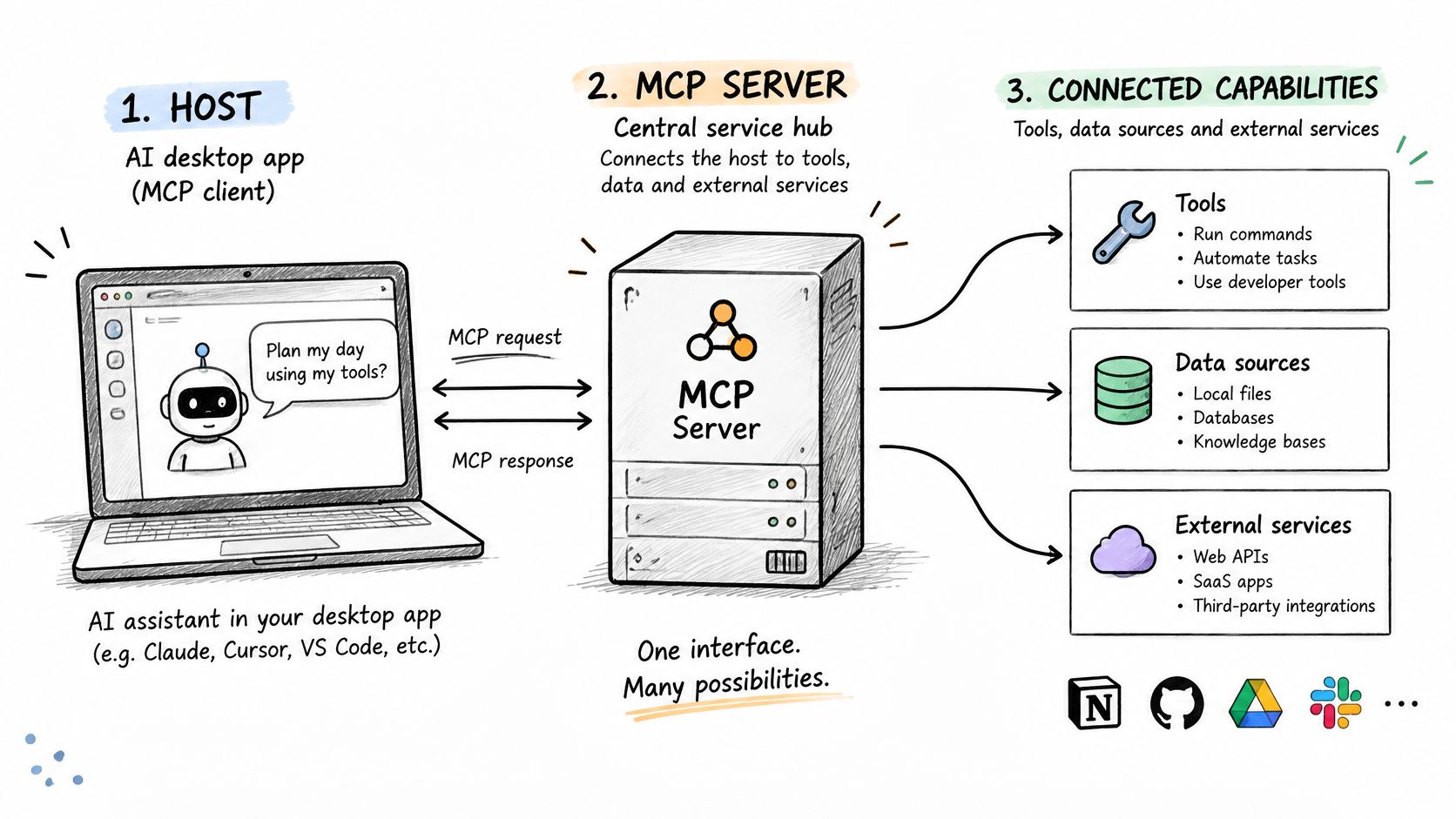
The three roles
- Host: The AI application the person uses, such as a desktop assistant or editor. It owns the conversation and decides what the model sees.
- Client: The connector inside the host. One client keeps one session with one server, so a host with three servers runs three clients.
- Server: The program outside the host. It exposes resources, prompts, and tools and runs the code behind them.
Messages between client and server use JSON-RPC 2.0. The client sends a request with a method name and parameters. The server replies with a result or an error. That fixed shape is why different hosts can talk to the same server without custom code for each pairing.
Anthropic’s announcement of the Model Context Protocol records that Anthropic introduced and open-sourced MCP on November 25, 2024, with a specification, software development kits, and reference servers. Before that, each AI application needed its own connector for each data source. N applications and M sources meant N times M integrations, each maintained separately.
With MCP, you build the server once and any compatible client can use it. The same pattern applies when you connect AI clients to seller data or to ad accounts, because the server holds the platform logic and credentials, not the model. If you’re mapping this onto marketing work, the overview of AI agents for marketing shows where an agent sits in that flow.
Draw it first: Sketch your host, one client per server, and the data source each server would expose. If you can’t name the source, you don’t need that server yet.
Core MCP Primitives and Discovery Methods
Every MCP server exposes some mix of three things. This table is the lookup you will check most often.
| Primitive | Controlled by | Discovery method | Read or run method | Typical use |
|---|---|---|---|---|
| Tools | Model | tools/list | tools/call | Executable operations such as queries or writes |
| Resources | Application | resources/list | resources/read | Contextual data such as records, files or reports |
| Prompts | User | prompts/list | prompts/get | Reusable interaction templates |
Control tells you who triggers the primitive. The model chooses when to call a tool, so tool definitions need the tightest checks. The application decides which resources to load as context. The user picks a prompt, usually from a menu, so it carries the least surprise.
Three rules for checking a server
- Declare only what you implement. A server advertises its capabilities when it connects. If it has no prompts, it must not advertise prompts, or clients will call prompts/list and fail.
- Send a list-changed notification when the list changes. If tools appear or disappear during a session, send notifications/tools/list_changed. That tells the client to call tools/list again instead of using a stale catalog.
- Pair every primitive with two methods. Before you test with a client, list what the server needs. Each item needs a discovery method and a read or run method, or the client can find it but can’t use it.
A reporting server might expose account records as resources and a metrics query as a tool, and skip prompts entirely. That’s fine. A small, correct surface beats a large one with empty methods.
The same check helps when you evaluate a third-party server before connecting it. For example, the steps to connect Claude Code to Search Console still come down to listing what’s exposed and confirming each method works. Session setup and version negotiation come next.
Transports and Connection Setup
A transport is how bytes move between client and server. You will meet two current options, plus one old one you should avoid for new work.
| Transport | Where the server runs | Authentication | Best fit |
|---|---|---|---|
| stdio | Local subprocess started by the client | Inherits the local user’s permissions | Desktop tools on a single machine |
| Streamable HTTP | Remote HTTP endpoint | Bearer tokens, API keys or OAuth 2.1 | Shared servers serving many clients |
| HTTP with SSE (superseded) | Remote endpoint with a separate SSE stream | Varies by implementation | Maintaining legacy clients only |
With stdio, the client launches the server as a subprocess on the same machine. The two exchange newline-delimited messages over standard input and output. There’s no network and no login, because the server runs with the local user’s permissions. That is simple, and it is also the risk. Anything that user can read, the server can read.
With Streamable HTTP, the server runs at one HTTP endpoint and serves many clients. Clients send POST requests and may receive Server-Sent Events for streaming responses. The session is tracked with an Mcp-Session-Id header. Use this for shared servers, team tools, and anything that touches client accounts.
The connection sequence
- The client sends initialize with its protocol version and capabilities.
- The server replies with its version, capabilities, and server information.
- The client sends notifications/initialized to confirm it is ready.
- The client calls tools/list, resources/list, and prompts/list to discover what is available.
- The client calls tools/call with a tool name and arguments, and the server returns content plus an error flag.
Read that sequence in a trace when a connection fails. If step 4 returns an empty list, the server declared a capability it didn’t implement, or authorization filtered everything out. If step 2 never arrives, the server crashed on startup.
The most common stdio fault is logging to standard output. Log lines corrupt the message stream, so send logs to standard error or a file.
Choose stdio for a personal, single-machine tool. Choose Streamable HTTP when more than one person, client, or account is involved. If a vendor only offers the superseded HTTP with SSE transport, plan the migration before you depend on it.
How to Design Tools with Clear Schemas
A tool definition is the contract the model reads before it acts. This diagram shows the parts that contract needs.
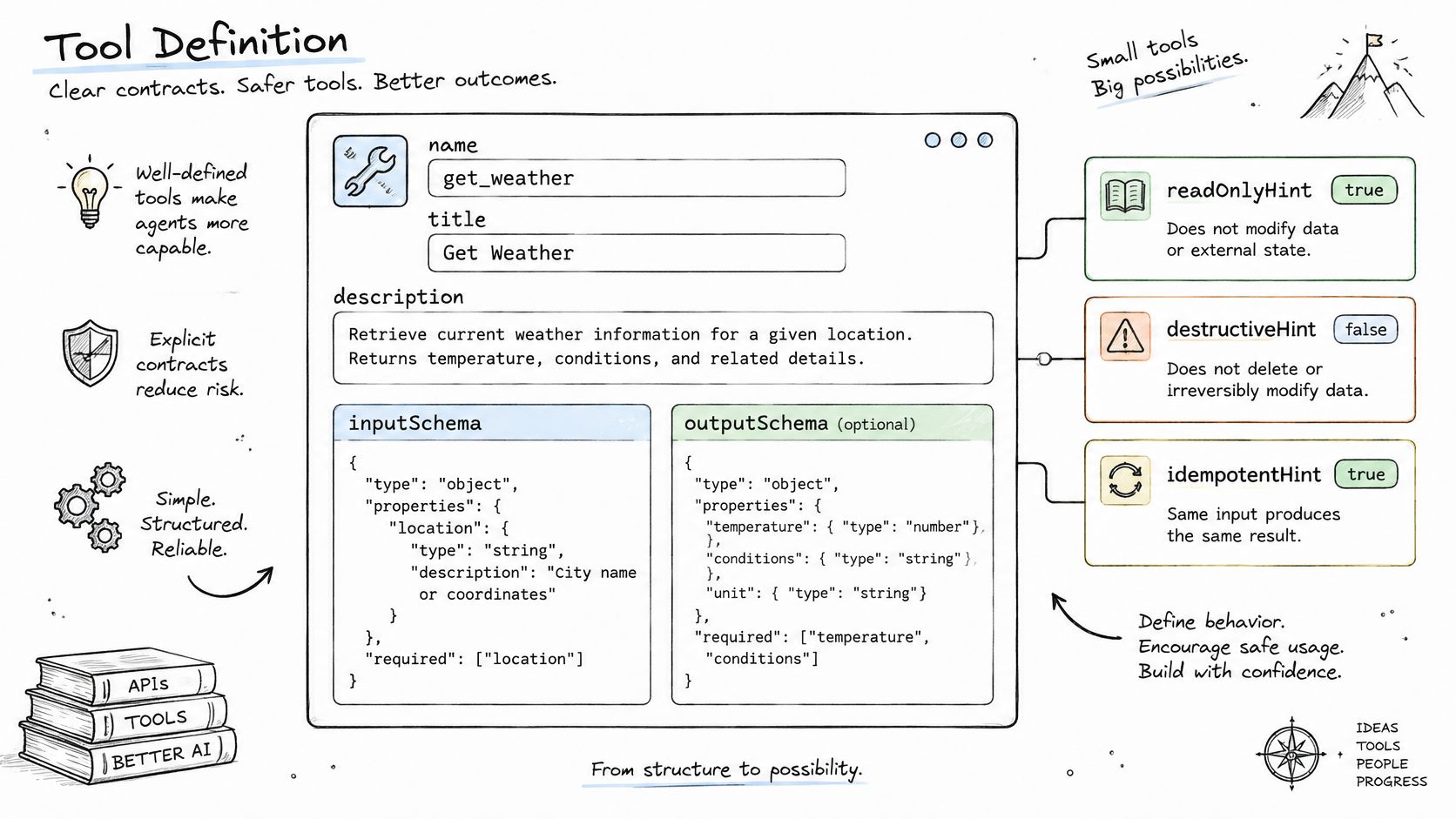
Each tool has a name, a title, a description, an inputSchema written in JSON Schema, an optional outputSchema, and annotations such as readOnlyHint, destructiveHint, and idempotentHint. The MCP specification architecture page defines an MCP server as a JSON-RPC 2.0 service exposing resources, prompts, and tools, with tools as model-controlled operations. That control model is why the schema does the safety work.
Build steps
- Choose a verb-noun name. Use get_campaign_metrics, not metrics or query. The model picks tools by name first, so a vague name gets picked for the wrong job.
- Write a description that states limits. Say what the tool returns, its units, its date range, and its maximum size. “Returns daily spend in account currency for up to 90 days” prevents guesses.
- Define inputSchema with explicit types. Use enumerated values for fixed choices, a stated date format, and a maximum page size. Reject anything outside that shape.
- Define outputSchema and return both forms. Return structured content for the client to parse, plus a short text summary the model can quote.
- Set annotations truthfully. A read-only tool must not claim to be destructive, and a pause tool must not claim to be read-only. Clients use these hints to decide when to ask for approval.
- Validate on the server, then return the error flag. When a check fails, return an error result with the error flag set and a field-level message. Don’t throw an unstructured exception the model can’t act on.
This walkthrough shows the same definition shape applied step by step.
The rule behind the schema
A tool runs code. Treat it as arbitrary code execution, not as a description of an API. The server enforces business rules itself, independently of the model, because the model can send any values the schema allows.
Say you build a pause_ad_set tool. It requires an account identifier and an ad set identifier. It rejects any identifier outside the caller’s scope, even if the identifiers are well formed. On success it returns the new status and a timestamp, so the caller can confirm the change without a second read.
Keep read-only reporting separate from writes. Put account and performance reads in resources or narrow query tools. Expose each write, such as a budget change or a campaign creation, as its own tool with its own schema and authorization check. The available tool list can also vary by the authorization on each request, so a read-only caller never sees write tools.
Test before you connect a client. Call each tool once with valid input and once with invalid input, such as a missing identifier or a date outside the allowed range. Confirm the first returns structured content and the second returns a clear error. If the invalid call changes anything, the validation is in the wrong place.
Authorization, Credentials and Tenant Isolation
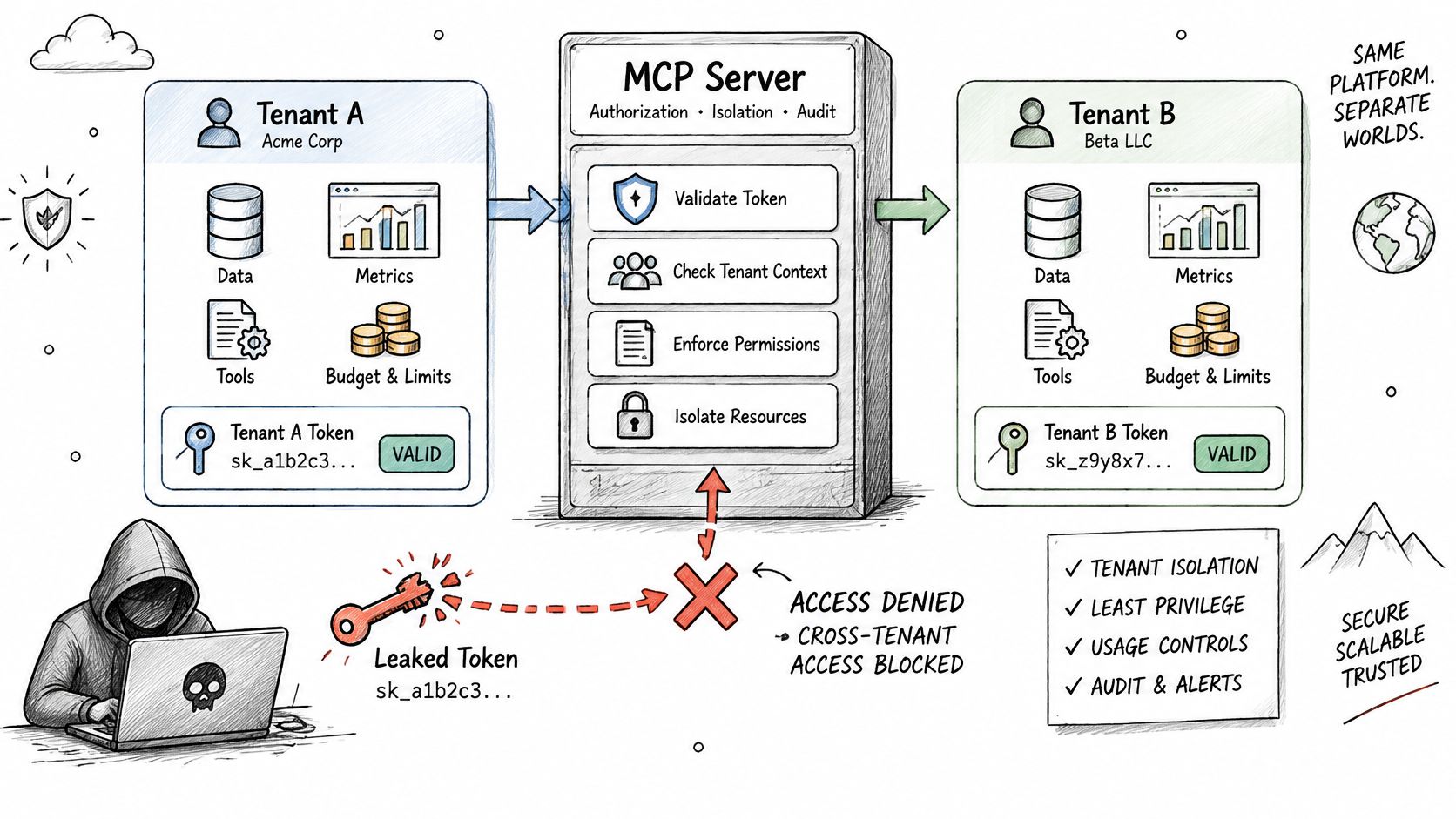
Consider a weak design first. One long-lived token opens every connected account, reads all metrics, and can push a budget change. Whoever copies that token from a log or a laptop gets all of it. The failure isn’t the leak alone. It’s that one credential had no boundary.
The baseline for a remote server
The MCP authorization specification models the client as an OAuth 2.1 client acting for a resource owner, with controls for token audience binding, token validation, token theft, confused-deputy attacks, and open redirects. In practice, that means five settings you don’t skip.
- Require HTTPS for every remote request, with no plain HTTP fallback.
- Use OAuth 2.1 with PKCE for user authorization, and exact matching for redirect URIs.
- Issue short-lived, audience-bound tokens so a token minted for one server fails on another.
- Validate the token and its scopes on every tool call, not only at connection time.
- Check the state parameter and issuer to block mix-up and confused-deputy attacks.
Platform credentials for Meta, TikTok, and Google Ads stay on the server. They never go into model context, tool results, or resource content. The MCP layer maps each request to an authorized organization, ad account, and operation scope before it reads any data. That server-side custody is also central to secure workflows for AI coding agents, where the same leak has the same cost.
Tenant isolation in one example
Vary the tool list by authorization. A token with read scope sees reporting tools only. A token with write scope also sees the pause tool. The hidden tools aren’t merely blocked if called. They aren’t listed, so the model can’t attempt them.
Now replay the leak. A stolen read token exposes metrics only for the accounts it covers, and only until it expires. There’s no path from that token to a budget change, and no path to another tenant’s accounts. That’s the outcome to test, account by account, especially when the server fronts a platform API such as the one covered in this guide to the Facebook advertising API.
Common Services a Production Server Provides
Most production servers settle into the same small set of services. The pattern below maps each one to its primitive and the extra control it needs.
| Service type | Typical primitive | Access level | Control to add |
|---|---|---|---|
| Account and campaign structure | Resources or read tools | Read only | Scope limited to connected accounts |
| Performance reporting | Query tools with date and metric parameters | Read only | Row limits and cursor-based paging |
| Changes to existing entities such as pause or budget | Write tools with explicit schemas | Write | Dry-run response and idempotency key |
| Creation of new entities | Write tools | Write | Created in a paused state by default |
| Activity and audit log | Read tool over stored records | Read only | Append-only storage with request origin |
| Hard deletion | Not exposed | Blocked | Omit the tool entirely |
Two rules make that table safe in practice. First, write tools return a dry-run response that shows the exact change before it applies, so a person or client can confirm the target and the new value. Second, every list tool accepts a limit and a cursor and returns the cursor for the next page. Without that, an agent can pull an unbounded report in one call and fill its context with rows it can’t use.
Say a campaign-operations server exposes a metrics query tool for reporting and a budget tool for changes. New campaigns are created paused, so nothing spends money on creation alone. There’s no hard-delete tool at all, which removes the worst outcome rather than guarding it.
Build in this order. Ship read services first and confirm paging and scope limits against real accounts. Add one low-risk write, such as pausing an ad set, with dry-run and idempotency keys. Add the remaining writes only after the audit log and tests are in place.
Ecosystem Risks and Maintenance Signals
A popular server is not automatically a safe server. The 2025 study of 1,899 open-source MCP servers found that 66% of servers contained at least one critical or blocker-level code smell. Maintenance is a risk on its own, separate from whether the tool list looks right today.
| Study metric | Figure | Check before adoption |
|---|---|---|
| Servers with general security vulnerabilities | 7.2% | Audit code before granting credentials |
| Servers with MCP-specific vulnerabilities | 5.5% | Review tool descriptions for injected instructions |
| Servers with credential exposure | 3.6% | Confirm secrets are stored and sent server-side only |
| Servers with at least one critical or blocker code smell | 66% | Allow time for maintenance before relying on it |
| Servers with reported bugs | 14.4% | Pin the version and run a test suite |
Read each row as a separate test. A server can have no known vulnerability and still store tokens badly. It can handle credentials well and still be unmaintained. Passing one check doesn’t clear the others.
Pre-adoption checklist
- Check the last commit. Confirm it falls within the past 90 days. Older than that, ask who is maintaining it now.
- Read open issues for credential reports. Search for token, secret, and key before you look at features.
- Pin the version. Never run a floating latest tag in production, because an upstream change can alter tool behavior overnight.
- Read every tool description. Look for hidden or injected instructions aimed at the model, not at you. This is tool poisoning, and it hides in text most reviewers skim.
- List dependencies and their licenses. You inherit both when you run the server.
- Run it against a read-only test account first. Grant write scope only after reads behave as documented.
Apply that to a candidate. A server last updated fourteen months ago that stores tokens in plain text fails the maintenance check and the credential check. It shouldn’t receive production credentials, however good its reporting looks in a demo.
Adopt a server only when it passes the maintenance and credential checks, then set an alert on its last update date so silence doesn’t go unnoticed.
Fast-growing ecosystems produce abandoned projects at the same speed. The alert matters because the risk arrives later, when a dependency breaks or a vulnerability is published and nobody ships a fix.
Deployment and Operations Controls
Protocol compliance gets a server connected. Operations controls keep it trustworthy after launch, when retries, restarts, and real traffic start.
Hosting and logging
Run the Streamable HTTP endpoint behind TLS termination with a health check that calls ping. Store Mcp-Session-Id state in shared storage so a restarted instance can continue live sessions instead of dropping them. If sessions live in one process’s memory, every deploy becomes a disconnect.
Write one log line per call with the caller, operation, correlation ID, outcome, and latency. On stdio servers, send those logs to standard error or a file. Keep the audit log separate and append-only, with the request origin stored on each record, so a later edit can’t rewrite history.
Limits, retries and versioning
- Rate limit per token and per account. One runaway agent shouldn’t exhaust a platform quota for every tenant.
- Require an idempotency key on every write. A retried call returns the original result instead of applying twice.
- Pin the server release. Announce capability changes with list-changed notifications, and test a client against the new version before rollout.
- Alert on specific signals. Error-rate spikes, rate-limit hits, and any write that arrives without a prior dry-run each need an alert, not a dashboard nobody opens.
Here’s a retry done right. A pause request times out, so the client sends it again with the same idempotency key. The server returns the first result and doesn’t pause twice. Both attempts appear in the log under one correlation ID, so you can reconstruct the event in minutes.
Confirm Your MCP Server Before Connecting Clients
Run these six checks in order. Each one is a pass or fail, not a judgment call.
- Authorization. Remote traffic uses HTTPS, and tokens are short-lived and bound to this server as their audience.
- Tool design. Every tool has an input schema, an output schema, and truthful annotations, and invalid input returns an error without side effects.
- Write safety. Write tools return a dry-run result, and newly created entities start paused.
- Logging. Every call writes one line with the caller, operation, request ID, and outcome, and the audit store is append-only.
- Limits and retries. Rate limits are set per token and per account, and every write requires an idempotency key.
- Live handshake. A test account runs initialize, tools/list, and one read call without errors, and sees only the tools its scope allows.
If every check passes, connect the first client and watch the first day’s logs closely. If one fails, fix that item before connecting anyone. A missing idempotency key or an over-broad token is cheap to correct now and expensive after an agent acts on it.
If you’d rather not build and operate this yourself, we run a managed MCP server for ad operations across Meta, TikTok, and Google Ads. The connector address is https://mcp.adcrunch.dev/mcp. Setup takes a few minutes. Connect the ad accounts, add the connector, and ask the first question. For how that setup fits specific clients, see the guide to Meta ads AI connectors.
Keep this checklist in the server’s runbook. Run it again after every schema change, scope change, or version upgrade. The same six checks catch most regressions before a client does.
If you want those controls without building the server yourself, AdCrunch gives your AI client read access across Meta, TikTok, and Google Ads, plus guarded write actions on Meta with a permanent activity log. Connect your ad accounts, add the connector, and ask your first question today.